|
Amplex Support https://support.amplex.net/knowledge-base/refreshing-your-network-equipment-fiber-customer/ Export date: Thu Jun 4 4:13:48 2026 / +0000 GMT |
Refreshing Your Network Equipment (Fiber Customer)Network Setup Overview 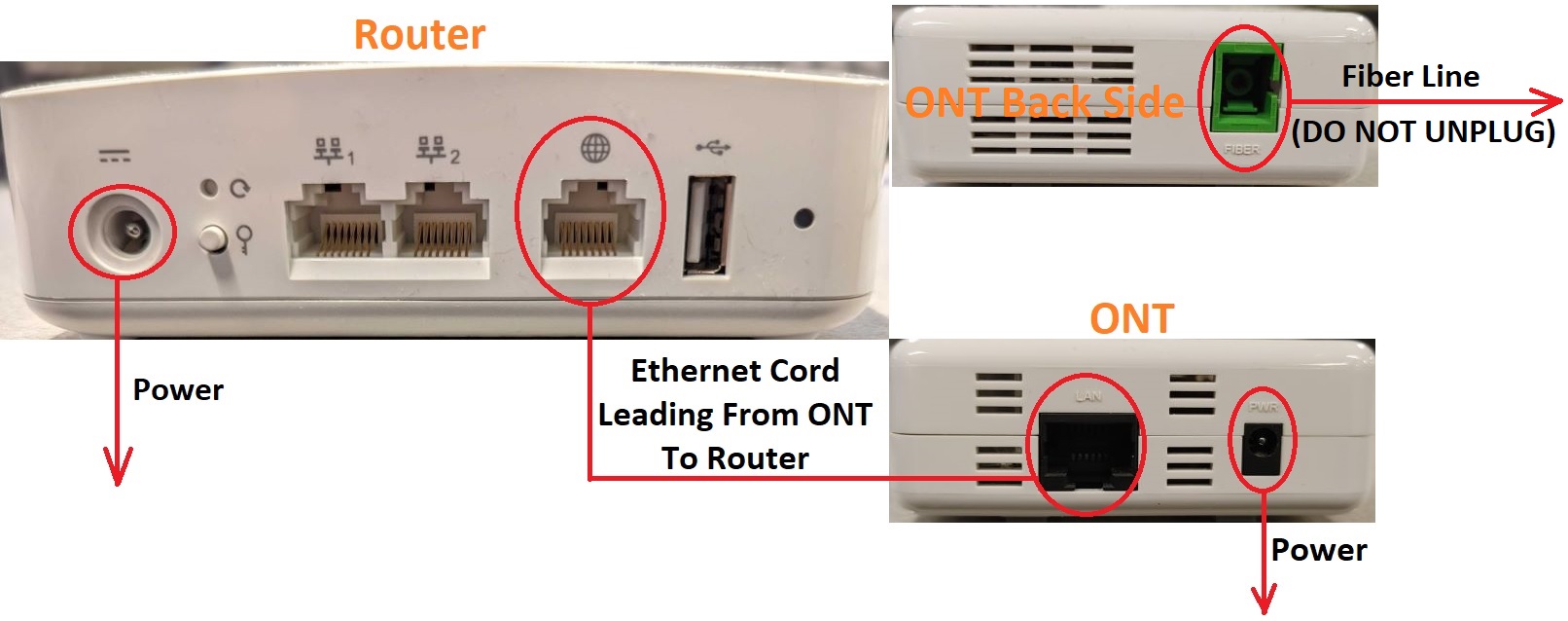 Below are some simple steps we recommend to do monthly that will refresh your network equipment and keep it running smoothly. Step 1. On the back of the router you'll see an Ethernet cable (looks like a large phone cord) plugged into a port that's titled one of the following: “WAN”, “Internet”, or it may just have a picture of a globe over it. Unplug this cable and then plug it back into the same port it was removed from, if it's a solid connection you'll hear a clicking sound. Step 2. Once the cord is plugged back in, follow the cord to the other end and you'll see the ONT device. The device looks like a small white brick with three lights on it titled: “LAN”, “Fiber”, and “Power”. On one end of the device you'll see two cords plugged into it, one is for power and one for the internet. Unplug the Ethernet cord (black phone-like port titled “LAN”) and then plug it back into the same port, if it's a solid connection you'll hear a clicking sound.
Step 3. After you plug the Ethernet cord back in, power cycle the ONT and router. Unplug the power cord from the ONT and router for a minimum of 15 seconds. This will cause both devices to do a full system check when they power back up (It may take 1-2 minutes for them to fully power up). |
|
Post date: 2022-07-25 18:49:50 Post date GMT: 2022-07-25 23:49:50 Post modified date: 2022-07-25 21:00:26 Post modified date GMT: 2022-07-26 02:00:26 |
